(1-Technology literacy)

Mr. / Girgis

Translate This Page
Dear visitor,
الذى فى الاعلى
AI Tools for Teachers
ChatGPT for Teachers
Overview:ChatGPT, developed by OpenAI, is a versatile
AI large language model that can assist language
teachers in a multitude of ways. It’s capable of generating
lesson plans, creating engaging learning materials,
creating rubrics, generating feedback and simulating
conversation partners for language practice.
Twee for Teachers
Overview: Twee is an AI tool designed specifically for
English language teachers. It allows educators to create
a wide variety of tailor made tasks and activities instantly.
It works especially well with authentic materials
e.g. videos from YouTube or Ted Talks.
Diffit for Teachers
Overview:Diffit is an AI tool that helps teachers create
differentiated learning materials tailored to various
proficiency levels. Alongside Twee, this tool is really a
game changer for creating bespoke material specifically
tailored for your exact needs, and works wonderfully
with authentic
materials.
Wordwall for Teachers
Overview: Wordwall is a versatile tool that allows
teachers to create interactive and engaging activities
for language learners. Whether you want to create a
quick quiz, a matching game, or a word search,
Wordwall has you covered with a wide array of
templates that can be easily customised to suit
your lesson objectives.
ChatGPT with Voice for Students
Overview: ChatGPT with voice integration is a game-
changer for language learners, offering an interactive
way to practise speaking and listening skills.
This tool allows students to engage in spoken
conversations with an AI, simulating real-life dialogue
situations.
Mizou for Students
Overview:Mizou is a wonderful tool where you can
create your own chatbot with specific learning objectives
and criteria, so that your students can engage with it to
practise speaking skills. It also protects student data –
it does not use student data to train its AI models
nor do students need to
login to use it.
GetPronounce for Students
Overview: GetPronounce is an AI tool designed to help
learners perfect their pronunciation. It offers instant
feedback on spoken English, making it a valuable
resource for improving accuracy, accent and clarity.
Quizlet for Students
Overview: Quizlet is a widely-used AI enhanced tool for
studying and memorising vocabulary through flashcards
and various study modes. Its interactive features make
it a favourite among language learners.
What is Literacy?

What is Information and
Communication Technology (ICT)?
Information and Communication Technology (ICT) include
computers, laptops, digital cameras, video cameras, digital
microscopes, scanners, cell phones, electronic games, digital
audio
devices, global positioning systems, electronic
whiteboards, the Internet, et cetera. ICTs in the classroom will
continue to evolve as new technologies emerge over time.
What is Literacy with ICT?
Literacy with Information and Communication Technology
(LwICT) means thinking critically and creatively, about
information and about communication, as citizens of the
global community, while using ICT safely, responsibly
and ethically.
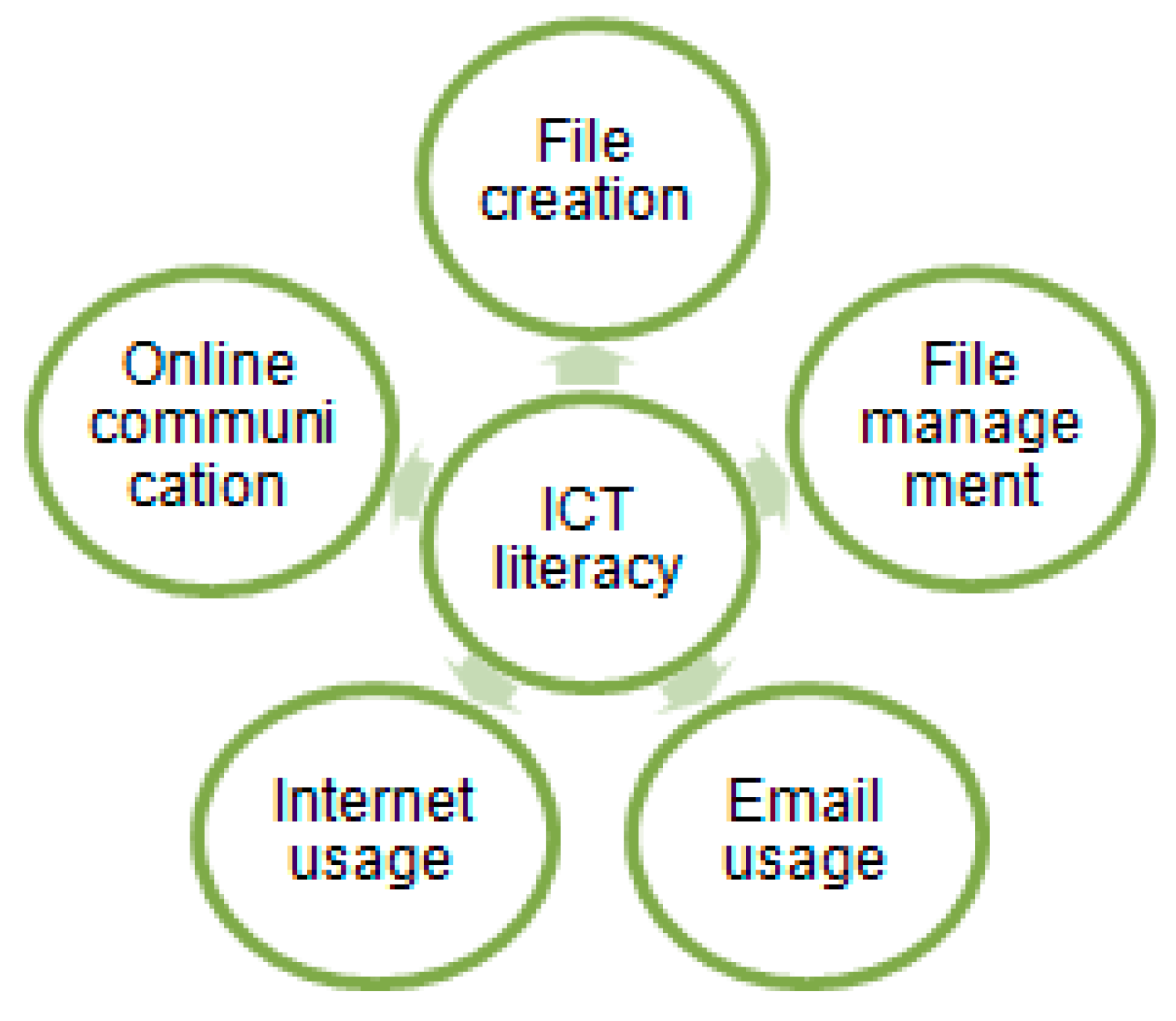
ICT literacy
ICT literacy refers to the ability to effectively access, use,
and manage information and communication technology.
It encompasses a range of skills needed to navigate digital
environments, including:
Technical Skills:
Understanding how to operate computers, software, and
other technology tools.
Information Skills:
The ability to find, evaluate, and use information from
various sources, including the internet, databases, and
digital libraries.
Communication Skills:
Using technology-based communication tools (like email,
social media, and video conferencing) to share information
and collaborate with others.
Critical Thinking:
Analyzing and assessing information for credibility and
relevance, and making informed decisions based on that
analysis.
Digital Citizenship:
Understanding ethical considerations and responsibilities
in a digital environment, including issues like privacy,
security, and cyberbullying.
Creativity:
Using ICT tools to create new content, whether through
writing, multimedia productions, or other forms of digital
expression.
ICT literacy is increasingly important in many areas,
including education, the workplace, and daily life, as
technology continues to evolve and play a central role in
communication and information dissemination.

The MOOC embraces ICT literacy
The MOOC embraces ICT literacy, as the course
itself is
online. Learners are required to be able to use a computer,
navigate the Canvas LMS and the course site, understand
how to post in
discussion forums, access and complete the
online activities and open
media such as the video
introductions in each module and a few
supplementary
slideshows.
The MOOC does not assume that all learners
had
strong ICT skills from the beginning, and provides a
number of different resources and detailed instructions that
learners could access if they need guidance.
These include:
1-Resources to learn how to navigate the LMS, including a
video overview of the course interface, instructions on how
you can
communicate with your instructor, details on how
to update your profile
and change notification settings, and
a link to a full Canvas guide.
2-Information on computer basics, including using your
mouse, working
with Windows, common computer
programs and apps, working with files and
folders, and
keyboard shortcuts.
3-Information on internet basics, such as explaining the
internet
browser, conducting an internet search,
downloading files from the web,
setting up an email
account, an introduction to cloud computing and how
to
make sure your computer is safe from viruses and spyware.
4-Clear instructions for how to use the technical tools in
completing
the discussion posts and learning activities (i.e.
“to make a new post,
click the Reply area directly below”;
“notice the icons located at the
bottom of the box which
allow for audio, video, photos and attachments.”)
How do Students Develop ICT Literacy?
Literate students support their critical and creative thinking
about textual, numerical, visual, and aural information as
they choose and use ICT, safely, responsibly and ethically.
They develop this literacy across the curriculum, through
inquiry, as they
- question and plan
- gather and make sense
- produce to show understanding
- communicate
- reflect on their learning
What is a Developmental Learning Continuum?
A developmental learning continuum is an assessment
tool for
based on teacher observations. It describes what
teachers see and hear
students doing, as they
demonstrate their literacy. Many teachers
already use
Continues for assessing learning in reading, writing
and numeracy.
What is the Developmental Continuum for Literacy
with ICT Across the Curriculum?
The Developmental Continuum for Literacy with ICT
paints a picture of how students develop their critical and
creative
thinking, in curricular context as they use ICT
safely, responsibly and
ethically.
Why Develop a Continuum?
Developmental Learning Continuum
A developmental learning continuum is an assessment
tool for
based on teacher observations. It describes what
teachers see and hear
students doing, as they
demonstrate their literacy. Many teachers
already use
Continues for assessing learning in reading, writing
and numeracy.
What is the Developmental Continuum for Literacy
with ICT Across the Curriculum?
The Developmental Continuum for Literacy with ICT
paints a picture of how students develop their critical and
creative
thinking, in curricular context as they use ICT
safely, responsibly and
ethically.
Why Develop a Continuum?

Technological teaching resources:
1-Twitter. 2-Facebook. 3-YouTube.
4-Blogs.
5-Nings. 6-WhatsApp? 7-SoundHound.
8-Skype.
9-Viber. 10-Image 11-Imo.
12-Messenger
13-Teachingchannel.org 14-rewordify.com
15-phraseum.com
16-PowerPoint 17-Online images
18-Voanews.com
19-Bbclearningenglish.com
20-Breakingnewsenglish.com
21-Merriam-webster.com
22-Oxforddictionaries.com
23-Eslgamesplus.com 24-Eslgamesworld.com
25-Quizlet.com
26-Kahoot.com 27-Lextutor.ca
28-Vocabulary Profiler
29-English Profile 30-Vocabulary.com
31-Gamestolearnenglish.com
32-Lexipedia.com
33-Kids.national-geographic.com
34-Freerice.com
35-Wordle.net
36-Duolingo
37-Learning Chocolate
Using Educational
Technology
in the English
Language Classroom
Traditional teaching aids
The machine shows and presents the lesson
smartly through:
1-TV.
2-Radio.
3-Data show.
4-Computer ( Word, Excel, PowerPoint and data-
base computer programs.)
5-Internet.
6-The overhead projector.
7-The virtual teaching.
8-The virtual teacher.
9- Electronic Chatting.
10-E- mailing.
11-Electronic Messages.
12-Online learning.
13-Online Distance learning.14- Cassette set.
15- Digital cameras.
16- CDs.
17- Video tapes.
18- Electronic dictionaries and maps.
19-Smart blackboard.
20- Satellite education channels programs.
21- Lap-top.
22- Classmate laptop.
23-Electronic full screen.
24- The iPad technology.
25-Interactive blackboard
26-Flash memory
27-Online Dictionaries.
28-Blogs
29-Wikis
30-Classroom network
31-Mobile phones.
32-Education Forums
33-The tablet computer.
34-Puppets.
35-The Robots.
35-Toys.
36-Robotic education.
37-Coding.
38-Data logging.
39-Digital systems.
40-Magnetic whiteboards and letters.
41-Listening posts.
42-Chemistry, physics and biology
Technology Resources online:
1-Google docs. to do:
1- Research paper.
2- Collaborative reading.
3- Online student collaboration.
4- Planning and assessment.
5- Visual communication.
6- Writing.
Click here to see Google Docs
2-Wordpress to do :
1-Writing.
2- Blogging.
3- Blog posts.
4-Webcomposing.
I conduct students counseling, progress reports and
surveys. I find Google forms to be my optimum tool
for gathering information from the students regarding
my staff's performance, the student's satisfaction
with the courses, material, language center and
even customer service.
3-Google forms to do:
Google Form users can now:
1-Do planning and assessment through surveys and quizzes
2-View responses as they are submitted
3-Insert videos and images into survey questions.
4-Create multiple choice grids that prevent respondents from
selecting the same column twice
5-Publish Forms with pre-filled responses
6-Insert useful add-ons.
7. Creating assessments for students
9. Building easy-to-use rubrics that can be shared with students
Click here to see Google forms.
4-Logomaker to do :
Visual communication. You can communicate with the
technology resource through using your eyes to see and
respond.
Click here to see logomaker
5-Internet readings to do :
Authenticity.
New forms of literacy and reading approaches are emerging
as a result of the Internet's increasing dominance as a major
source of information. To foreign language learners, the
Internet is a tool through which they can access authentic
target language content.
Anything can be used as authentic material but for developing
reading one of the most useful resources is the Internet, with
large amounts of varied material being easily accessible.
Click to see internet readings
6-Kahoot
Kahoot is a free student-response tool for administering
quizzes, facilitating discussions, or collecting survey data. It is
a game-based classroom response system played by
the whole class in real time. Questionsare projected on a
shared screen, while an unlimited number of players answer
the questions with their smartphone, tablet or computer;
Click here to go to Kahoot
7-The Web Resources:
A web resource is anything that can be obtained from the
World Wide Web. Some examples are web-pages, e-mail
information from databases, and web-services Web
resources have changed since the internet was first created.
The early concept was of static (non moving) files or
documents. The meaning
of the term now has a wider
use to include nearly everything that can be obtained via
the Internet. Uniform resource locators or URLs, are used
to identify a resource on the web.
Click here to know about Web Resources.
8-Voice of America Learning
English:
Learn American English with English language
lessons from Voice of America.
VOA Learning English helps you learn English with vocabulary,
listening and comprehension lessons through daily news and
interactive English learning activities.
Click here to see VOA, learning English.
9-Grammarly:
Your writing, at its best. Grammarly
makes sure everything you type is clear, effective,
and mistake-free. Grammarly's free online grammar
checker finds and instantly corrects grammar,
spelling, and other writing errors in your text.
With our free desktop app, you can
drag and
drop documents on the
Grammarly icon to instantly improve
your writing. Grammarly adapts to
your needs and writing style, giving you
the confidence of mistake-free
communication every time you write.
Click here to see Grammarly
10-TED Talks
TED
is, to put it simply, amazing. They’re
known for sharing short,
brilliant journeys full
of insights from thousands of great people
around the world.
Click here to see TED Talks
11-YouGlish:
Use YouTube to improve your English pronunciation.
With more than 30 M
tracks, YouGlish gives you
fast, unbiased answers about how English is spoken
by real people and in context.
Click here to see YouGlish
12-Corpus of Contemporary
American English:
The Corpus of Contemporary American
English (COCA) is the largest freely-
available corpus of English, and the
only Large and balanced
corpus of
American English.
COCA is
probably the corpus of
English, and it is related to many
other corpora
of English that we have
created, which offer unparalleled
insight into variation in English.
The corpus contains more than 560
million
words of text
(20 million words
each year 1990-2017) and it is equally
divided among
spoken, fiction, popular
magazines,
newspapers, and
academic texts.
Click here to see corpus of
contemporary American
English
13-Edmodo:
Edmodo is an easy way to get your students
connected so they can safely
collaborate, get and
stay organized, and access assignments, grades,
and
school messages. Edmodo is dedicated to
connecting all
learners with the people and
resources
they need to reach their full potentia.
Edmodo is an educational technology company
offering a communication,
collaboration, and
coaching platform to K-12 schools and teachers.
The Edmodo
network enables teachers to share
content, distribute quizzes, assignments, and
manage communication with students, colleagues,
and parents.
Click here to go to Emodo
14-Socrative:
Socrative is your classroom app for fun, effective
classroom engagement. No
matter where or how
you teach, Socrative allows you to instantly connect
with students as learning happens.
Quickly assess students with prepared activities or
on-the-fly questions to get immediate insight into
student understanding.
Socrative empowers you to engage and assess
your students as learning
happens. Through the
use of real-time questioning, result aggregation,
and
visualization, you have instant insight into levels
of understanding so you can use
class time to better
collaborate and grow as a community of learners.
Click here to go to Socratine.
15- LessonCast:
LessonCast
is a website where experienced
teachers submit—via PowerPoint,
document,
pictures, or web cam—a "lesson idea or
management strategy in 2
minutes 30 seconds or
less." Each submission is reviewed and vetted by
other accomplished teachers, and then shared online.
New teachers, or
those just looking for new ideas,
can then search for the perfect idea
for their
classroom. Note: This site is still growing,
so there are a
few holes.
16-Glogster EDU:
Create Glogs: "interactive visual platform in
which users create a poster or web page containing
multimedia elements including: text, audio, video,
images,
graphics, drawings, and data." Students
can use these Glogs for book
reports, digital posters,
homework, etc.;
You can use Glogs for lesson
preparation,
presentations, distance teaching, and more. Note:
This website is still in Beta (testing stage).
17-SchoolTube:
You've heard of YouTube and Teacher-tube, now
check out school tuvw, endorsed by leading
education associations. It's a safe, moderated
environment where students can post self-produced
videos for classroom
use: from the educational (a
civics presentation or algebra class) and
practical
(morning announcements) to the fun (last night's
girls' soccer
game).
Although you might not find video content that will
help you
teach (because it is all very specific to
classes and schools), this is a
great tool for giving
your students a safe platform to share their
creations.
18-Storybird:
They are "short, art-inspired stories you make to
share, read, and print."
Using the images provided
by artists and illustrators, students can
write and
design their own online books working alone or
collaboratively
with classmates—or they can spend
time enjoying the published "library"
of Storybirds.
The Teacher functionality allows you to create a
private
group, manage students' assignments,
and grade work
19-Free Rice 2.0:
Though you may remember the original incarnation
of Free Rice—with
its addicting vocabulary
game that donates rice via the World Food
Program
for every right answer—version 2.0 features 15
different
topics for testing, including multiplication
tables, Spanish language learning, and flags of the
world.
Registration is optional, but
necessary if you want
to keep track of scores. Keep in mind this site
is for
all ages, so there will be plenty of ads.
20-Flashcard Machine:
Teachers and students alike can create on-screen
flash cards to test vocabulary,
math equations,
foreign languages, and more. Test
your students'
knowledge in class, or encourage them to use the
flashcards for homework. There are scores of
flashcards in their
database that are ready-to-use,
but beware of user-generated content. There is an
app available for the iPad, iPhone, and iPod touch.
21-Bitstrips for Schools:
Design your own cartoon characters, write dialogue,
and create online comic strips to teach
students
any number of subjects and topics. There are plenty
of
activities already on Bitstrips for schools to get
you and your students started.
22-Kidblog:
Interested in starting classroom
blogs to improve
student writing skills but not sure how to keep your
class in a safe environment? Kidblog is a simple
blogging platform with advanced privacy features
appropriate for elementary and middle school
students; teachers have
administrative control over
what gets published—and what doesn't.
Electronic teaching and learning programs:
( Word program, Excel program,
Power-point
program, Access program, MS picture
management program, Movie-maker program, Free-
mind program, Lingoes program, Celestia
program,
Yanka program, Anki program, Jing program, Hot
potatoes
program, MS Mathematics program, the
Sage program, Chemistry crocodile
program,
Physics Crocodile program and a lot of other
electronic programs. Electronic teaching enables
the teacher to do an electronic
lesson plan and
give an electronic lesson presentation.)
|
51_2_6_porcaro.pdf Size : 128.37 Kb Type : pdf |
|
51_3_3_samuels.pdf Size : 141.177 Kb Type : pdf |