Artificial Intelligence & Data Analytics.

  • Home
  • About
  • My CV
  • Education
  • Learning
  • Active learning
  • Teaching
  • Teaching Tools
  • Teaching Topics
  • Teaching Methods
  • School Activities
  • Curriculum-Culture
  • Assessment - Evaluation
  • Classroom Management
  • Century Skills
  • Language Skills
  • Linguistics
  • Grammar
  • Publications-Achievements
  • Business Lectures
  • My Blog
  • Contact
  • Abouna Fanous Site


University Lectures


Meet your lecturers in Business Management


Lecture:  ( 9 )


9- Artificial Intelligence

 & 

Data Analytics.


Mr. / Girgis


Go to my Blog


https://mrgirgis.blogspot.com/


Click here to go to : Abouna Fanous Site.


موقع عمى أبونا فانوس الأنبا بولا


email-logo – Jenny Brook Bluegrass


E-mail  1  :  girgishannaharoun@yahoo.co.uk


  E-mail    2  : girgishanna027@gmail.com


اضغط هنا لتصل الى فيديوهات موقع ابونا فانوس و تنال بركته


VK8GFP9HFt9BbBrZe58JpDvB9NEdhFIgtrOB-I8YcSjs9DNu9yWv_6L9Qb-bnK0v.jpg

Translate This Page


“This poor man cried out, and the

 LORD heard him, and saved him

 out of all his troubles    

.”Psalm 34:6


free-clipart-important-notice-9 | Chippewas of the Thames


Humor:


Girl Laughing Hysterically Stock Photo ...


Teacher


I wish you’d pay a little attention,

David.


David:

 I'm paying as little as I can, 

teacher.


Dear visitor,


Use the language selector 

above to go through my whole 

site using any native language 

you speak,

then you can enjoy my

YouTube channel.


اختاراي لغة من لغات العالم /  اللغة التى تريد 

تصفح موقعى باستخدامها . استخدم المؤشر
 

الذى فى الاعلى


I register a  video presentation

 in my YouTube channel for

each page of my site.


Next,use the other world site 

selector above to go to the 

search engine site or the social 

media site you like.


My YouTube Channel:


منهج الانجليزى ثانوية عامة / و شكل و طريقة امتحا ن

 نظام التعليم الجديد 


والتصحيح الكترونيا


Business Courses - Masterclass – House of the Reader


1- Business studies.


2- Hospitality Management.


3-Business strategy / management


4-Intenational business.


5-Marketing and consumer Behavior.


6-Economics & Public Policy.


7-Entrepreneurship and Innovation


8-Accounting and Auditing


9-Artificial Intelligence & Data 


Analytics.
10-Food & Beverage Management.


11-Event & Convention Management.


12-Finance & Investment.


13-Operations & Supply Chain.


14-Tourism & Destination Management.


15-Hotel & Resort Operation.


16-Human Resources & Leadership.


17-Human resources and Management.


18-HRM and Education.


Artificial Intelligence

 & 

Data Analytics.


Introduction


Artificial Intelligence (AI) and Data Analytics are two

transformative fields that are revolutionizing industries

 by enabling smarter decision-making, automation,

and insights extraction from vast amounts of data. 


While AI focuses on creating systems that can

perform tasks requiring human intelligence,

 Data Analytics involves analyzing data to 

uncover meaningful patterns and insights.


Artificial Intelligence (AI) and data analytics,

when combined, transform raw data into actionable, 

proactive insights by automating data cleaning, 

analysis, and interpretation. This partnership

 allows organizations to move from reactive reporting 

to predictive modeling, enhancing decision-making 

across sectors. Key techniques include machine 

learning for forecasting and NLP for analyzing 

unstructured data, such as.


Artificial intelligence (AI) uses programming 

techniques inspired by natural learning. AI

enables computer systems to solve problems

 with accurate data, context, and environment 

interpretation. Examples: reading text, driving cars, 

image recognition, and industrial machine control.


Summary


AI automates data preparation, enables natural 

language querying, and delivers real-time insights 

that replace static reporting across analytics 

workflows.


AI accelerates analysis, detects patterns humans 

miss, and democratizes access to insights, but 

organizations must address risks like bias, data

 quality issues, and over-reliance on automation.


AI handles routine tasks like data cleaning and report

 generation, freeing analysts to focus on judgment-

intensive work, business context, and model oversight.


What AI for Data Analytics Means


As AI becomes increasingly integral to how 

organizations work with data, more teams are 

adopting AI-based tools to move faster and make 

better decisions. Instead of relying solely on manual 

queries, dashboards and human‑driven interpretation,

 modern analytics can now incorporate AI/ML,

 natural language processing (NLP) interfaces and 

automated workflows that augment human workflows.


For example, generative AI makes analytics more 

accessible by allowing people to ask questions in 

everyday language instead of writing SQL queries

 or using complex BI tools. Automation reduces the 

manual effort required to clean data, generate 

features and run models, freeing analysts to focus

 on higher‑value tasks.


Compared with traditional analytics, where teams 

manually prepare data and build reports, AI can now 

perform many of the more routine and repetitive tasks

.. Analysts still guide the process, but by incorporating 

AI, analytics teams can prepare data more reliably, 

generate insights faster and make predictions part 

of everyday decision‑making.


At Databricks, we don't consider AI to be a separate 

add‑on, but rather an integrated capability that 

enhances every step of the data lifecycle when 

built on a unified, well‑governed foundation.


Getting Started with AI for Data


 Analytics


AI supports common analytics tasks such as classifying 

data, identifying trends, answering natural‑language 

questions and recommending next-best actions, 

although organizations must still manage risks like 

biased outputs, poor data quality and governance 

issues. To get started, analysts need foundational 

data literacy, comfort with basic ML concepts and 

the ability to validate results.


Most teams begin by establishing a unified data 

foundation and piloting small, high‑value use cases, 

but whether it’s forecasting demand or helping 

business users explore data conversationally, AI 

extends what analytics teams can accomplish and 

makes insights more widely available.


How AI Enhances Each Stage of the 


Data Analytics Workflow


In data analytics, workflows typically move through 

the following stages:


  • Data collection

  • Preparation

  • Analysis

  • Visualization

  • Decision‑making


Each step has its own challenges, but AI can play

 a meaningful role that is specific to each.


Data Collection


In this stage, AI helps teams gather information from 

a variety of sources without the need to build custom 

pipelines for each one. Automated systems are able

 to pull data from applications, documents, sensors 

and APIs, then classify it for analysis. AI also deals 

with large datasets more efficiently than traditional 

tools, which is especially valuable when organizations 

collect data from multiple business units or real‑time 

streams.


Preparation


During the data cleaning and preparation stage, 

AI can identify anomalies, missing values and 

inconsistencies that would take an analyst much 

longer to find. It can also automate repetitive tasks

 like formatting fields, standardizing labels and 

joining datasets. This reduces the time employees 

have to spend on manual prep work and improves

 the quality of downstream analysis by basing it on 

higher‑quality data.


Analysis


This stage is where AI can help recognize patterns, 

predict outcomes and detect unusual behavior. AI-

driven models are able to run continuously, which 

makes real‑time analysis and forecasting possible. 

Instead of waiting for scheduled reports, teams 

can see changes as they happen and respond 

immediately.


Visualization


AI tools can easily create charts, dashboards and summaries

based on the underlying data. NLP technologies also 

enable users to ask questions in a conversational 

way and receive clear explanations in return. This 

makes complex analysis easier to understand and 

helps nontechnical users explore data without 

needing advanced skills.


Decision-making


AI elevates this stage by moving teams from 

decisions based on historical reports to 

forward‑looking strategies. Modern AI solutions 

can surface anomalies, forecast emerging risks 

and opportunities and distill unstructured signals 

such as customer sentiment into patterns that 

leaders can act on. Combining this with Natural 

Language Querying reduces data preparation time 

while providing analysts with insights based on real-

time, “what-if” scenarios that drive timely action.


Practical Examples of AI-powered 


Analytics in Action


As organizations mature in their use of AI for data 

analytics, and while there is certainly plenty of room 

for further development, it makes sense to look at 

some of the ways AI is currently being used 

successfully in the following categories:


  • Scenario-based workflows

  • Real-time analytics

  • Natural language querying

  • Accelerating time-to-insight


Scenario-based Workflows


One common scenario-based example is sentiment 

analysis, where AI analyzes customer feedback, 

social posts or support tickets to determine whether 

customers feel positive, neutral or negative about a 

product or service. This helps teams understand 

trends in customer experience without having to 

read thousands of individual comments.


Predictive analytics is another widely used workflow, 

where AI models provide forward‑looking insights, 

such as forecasting demand, estimating churn or 

predicting which sales leads are most likely to 

convert.


Anomaly detection can flag unusual patterns in 

transactions, sensor readings or system logs so 

teams can investigate issues before they escalate.


For organizations with large datasets, AI can also 

generate quick summaries that highlight key

 themes or changes, saving hours of manual review.


Real-time Analytics


By conducting AI‑powered real-time analysis, 

retailers can forecast sales for specific days and 

adjust staffing or inventory levels. Manufacturers

 can identify operational issues as they happen by 

monitoring equipment data. Logistics teams can

 track delivery performance and anticipate delays. 

Real‑time insights like these help organizations 

reduce the lag between data collection and action.


Natural Language Querying


Natural language querying makes analytics more 

accessible. Instead of writing SQL queries or 

navigating dashboards, users can ask questions

 like “What were our top‑selling products last 

quarter” or “Show me regions with rising support 

volume.” AI interprets the question, runs the 

analysis and returns a clear answer, lowering the 

barrier for nontechnical users of business data.


Tools and Platforms Enabling AI for


 Data Analytics


AI‑driven BI tools increasingly feature core capabilities 

to support key data analytics workflows. Predictive 

features support trend forecasting and risk 

identification. Generative AI can summarize datasets 

or translate technical findings into plain language. 

Natural language querying makes exploration more 

intuitive, while AI‑assisted visualization and 

workflow automation reduce the manual effort 

behind dashboards, data prep and routine reporting.


The right tool still depends on the problem you’re 

solving. Forecasting requires strong predictive 

models, dashboard automation benefits from 

AI‑driven visualization and spreadsheet augmentation 

is far easier with natural‑language features that cut 

down on complex formulas. At the moment, some 

tools are better at some capabilities than others, 

although the trend is clear. The modern BI stack is 

converging toward a unified suite that includes all of 

them. Databricks AI/BI brings these capabilities together 

in one platform, pairing governed data with 

AI‑assisted analytics for faster, more reliable insights.


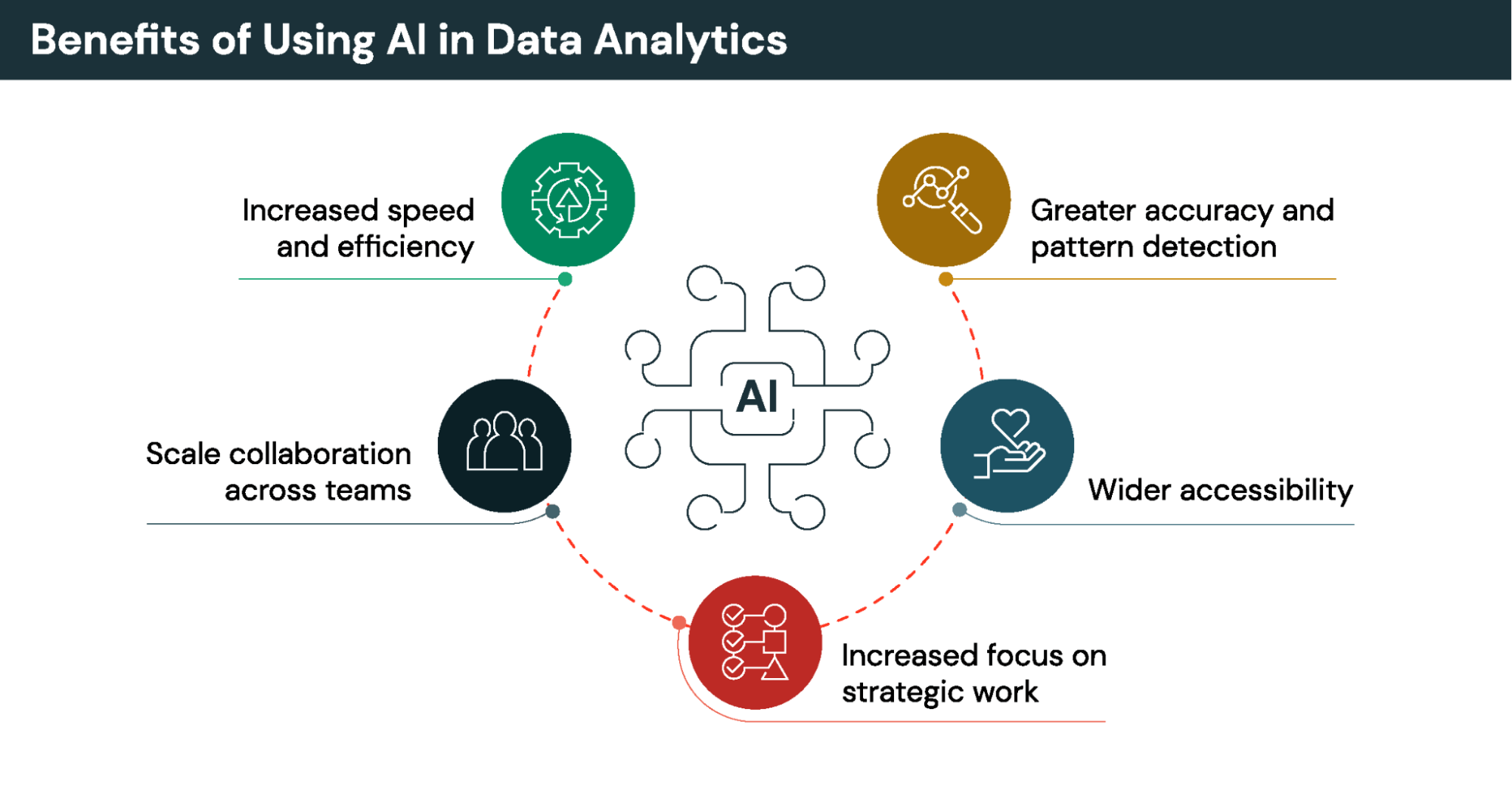
Benefits of Using AI in Data Analytics


The benefits of using AI for data analytics generally center 

around productivity, efficiency, accuracy, accessibility 

and scalability. Specific benefits include:


Faster real‑time analysis:


AI processes large datasets quickly and updates 

insights continuously, enabling a shift from static 

reports to always‑current intelligence.


Improved accuracy and pattern 

detection:


ML models uncover subtle trends, anomalies and 

relationships that humans often miss, reducing 

error and strengthening analytical rigor.


Democratized analytics across 

technical and business users:


Natural language interfaces let anyone explore

data in everyday language, lowering barriers and

broadening participation.


Scalable insight generation:


Automated workflows, shared models and unified 

platforms deliver consistent insights across teams, 

freeing analysts for higher‑value strategic work.


AI in Data Analytics


Limitations, Risks and Ethical 


Considerations


While incorporating AI into analytics can significantly

 improve data intelligence, it also introduces risks. 

These risks shouldn’t prevent adoption, but they do 

highlight the need for a strong data foundation and 

responsible practices. The following are some key 

areas to consider.


Bias, interpretability and Data Quality


AI outputs depend heavily on the data they learn from.

 If the data is incomplete or biased, the results may be 

as well. Interpretability is another challenge. Some 

models act like black boxes, making it hard to 

understand how they reach conclusions. When

 internal reasoning isn’t visible, it is even more

 important to maintain trust in AI outputs by ensuring 

the data is clean, accurate and well‑documented.


Human Oversight and Governance


AI can generate insights quickly and confidently, 

which may lead users to over‑rely on automated 

results without validating them. AI is powerful, but 

it’s not infallible. Analysts remain essential for 

reviewing outputs, validating assumptions and 

ensuring insights align with real‑world context.


That’s partly why governance is also important. 

Organizations must manage version control, 

maintain reproducible workflows and support 

audit trails to track how models were built and

 how results were generated. Without these 

controls, troubleshooting becomes difficult and 

compliance risks increase.


Privacy and other Challenges to 


Consider


AI systems often work with sensitive data, which may

 raise privacy and ethical concerns. Organizations 

must ensure that data is collected and used 

responsibly, with proper safeguards and access 

controls in place.


One question to consider is the ethical impact of

 using AI for analytics. Companies must handle

 data responsibly and help customers understand

 how their information will be used. Transparency

 is also essential. Organizations should be able to 

explain how AI models work, what data they rely

 on and how they inform decisions. Ethical use

 also requires human oversight to ensure AI

 supports decision‑making rather than replacing 

judgment or accountability.


Another common question is whether it’s okay to

 rely solely only on AI for data analysis. It is not. AI 

can speed up analysis and generate insights, but it 

cannot replace human expertise, domain knowledge 

or ethical judgment. The strongest analytics

 workflows combine AI‑driven automation with 

thoughtful human oversight to ensure accuracy

 and accountability.


How AI is Changing the Role of


 Data Analysts


AI is already reshaping the day‑to‑day work of data 

analysts by shifting the balance of responsibilities 

away from manual tasks and toward more complex, 

judgment-oriented activities. Analysts can now rely 

on AI to automate things like cleaning data, building 

routine reports or writing repetitive queries, as well 

as preparing datasets, generating summaries,

 creating visualizations and identifying patterns 

much faster than they could do manually.


However, there are things analysts can do that AI 

can't, or not as well, such as evaluate tradeoffs or 

decide which insights matter most to their team. 

Analysts provide the judgment, domain knowledge

 and critical thinking needed to interpret results and 

guide decisions. They also validate AI‑generated 

outputs to ensure the logic is sound and the 

conclusions are verifiable.


One other change is that many analysts now spend 

more time on crafting effective prompts for AI 

responses, or choosing the right combination of 

models, queries and workflows to answer a business 

question. Oversight is another growing responsibility. 

Analysts may find they spend more time monitoring

 data quality, checking for bias and ensuring that 

automated insights are accurate and trustworthy.


These changes connect directly to a common 

question: Will AI replace data analysts? The answer

 is that while AI can automate tasks, it can't replace 

the strategic thinking, contextual understanding and 

ethical judgment that analysts bring. AI elevates the 

analyst role, allowing analysts to focus on discovering 

deeper insights and more impactful decision support.


Skills and Getting Started with AI


 in Analytics


While AI is creating new opportunities and changing 

responsibilities for analysts, people in those roles 

should still strive to stay competitive by developing 

relevant skills. =Emerging skills like prompt design 

will help you get better results from AI-powered BI 

tools.


Many teams begin with low‑barrier experiments that 

use sample projects, accessible tools and sandbox 

datasets. Many platforms offer guided notebooks or 

built‑in examples that walk users through common 

workflows. These small use cases help analysts

 build confidence while they learn how AI fits into 

their existing processes.


At the team level, a simple workflow is a great way 

to learn. Analysts can build a basic predictive model 

that forecasts a single metric, such as weekly demand

 or customer churn. Or they might try running 

sentiment analysis on customer reviews to see 

how AI classifies positive and negative feedback.


By developing these skills and experimenting with 

entry-level tools, analysts can begin using AI in 

meaningful ways and prepare for more advanced 

applications.


The Future of Data Analytics with AI


The future of data analytics is almost certain to be 

influenced significantly by the trajectory of advances

 in generative AI and automation. As generative AI is 

expanding what teams can automate, it is also making 

data more accessible. As predictive modeling matures 

we should expect it to become more accurate and 

more adaptive as the models learn from new data. 

Autonomous data exploration is also likely to increase, 

thanks to systems that can scan datasets, detect 

patterns and surface insights without being prompted.


Another major shift to keep an eye on is the rise of

AI agents that support or augment analysts. Acting as 

intelligent partners, these agents will be able to help 

run queries, monitor data quality, recommend models 

and flag anomalies, thus extending an analyst’s reach 

and accelerating their decision‑making.


Conclusion


AI is reshaping data analytics in meaningful ways

 by speeding up routine tasks, improving accuracy 

and making insights easier for more people to 

access. From data preparation to visualization,

 AI is opening the door to new levels of automation

 and exploration.


If you'd like your company to start using AI with 

data analytics, the best way to begin is choosing

 one workflow area to pilot an AI‑driven 

improvement. This could be automating a recurring 

report, summarizing a dataset with NLP tools or 

testing a simple predictive model. Small, focused 

experiments help teams learn what works and

 build confidence before they take on more

 complex initiatives.


Whether you're just starting out or well on your

 way, the message is simple: AI expands what is 

possible with data analytics, but human judgment 

remains essential. When AI and human expertise 

work together, organizations can use AI to unlock 

faster insights and make better decisions based 

on their data.


To learn more about how AI-powered data 

intelligence powers business intelligence,

compound AI systems or the new Databricks

offering AI/BI Genie that helps you converse with 

your data through natural language, get your copy 

of our eBook.


More resources:


1-Pre-Shool Education.


2-Primary Education..


3-Middle School Education


4--High schools Education.


5-USA Education System.


6-UK Education System


7-Egyptian Education System.


8-Classroom Language  Journal.


9-storytelling Classroom.


10- Twenty Testing mistakes to avoid.


forum 52 3


 Teaching Forum 2014, Volume


52, Number 3


1-Assessment Literacy


2-Using Locally Relevant Authentic 


1- Critical thinking  ( 1 ).


2- Critical thinking  ( 2 ).


3-Teaching Referencing


4-Blogs and Networks .


5-Communication practice


Flag Counter


Tweet

Make a free website with Yola